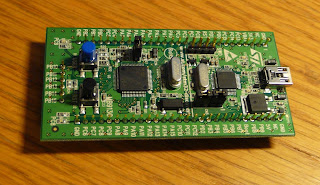
Here's an overview of all the tools I'm aware of. First off, I'll explain the easy, official options. These are unfortunately only for Windows users.
Officially promoted toolchains
ST provides example code and documentation for three toolchains: Atollic TrueSTUDIO, IAR Embedded Workbench and Keil MDK-ARM.
Download ST's example firmware package here
User manual for the firmware package
Below are some quick facts & links about the official toolchains.
Atollic TrueSTUDIO (Windows)
This is an Eclipse-based development platform that includes an optimizing C/C++ compiler, editor and a debugger. With the free Lite version, you lose the C++ support, but you get unlimited code size and usage time. If you eventually use the Lite version to design an embedded product, they want you to note it in the user documentation of your product. There is also a 30-day trial version available which has all the functionality of the Professional version. If you use Windows, this toolchain is probably the best & easiest choice to start with. According to a forum post I read, it doesn't work under Wine.
Download Atollic TrueSTUDIO for STM32 here
Lite version vs. Professional comparison
ST user manual for Atollic TrueSTUDIO
emcu.it tutorial: Start new project using Atollic & STM32VLDISCOVERY
emcu.it tutorial: STM32 library examples in Atollic
emcu.it tutorial: how to use the ST code examples with Atollic
IAR Embedded Workbench (Windows)
| IAR Embedded Workbench |
The Kickstart edition is a free version of the IAR Embedded Workbench. It's limited to 32kB code size, but otherwise it's fully functional. You have to register it in order to get a license key.
ST User Manual for IAR Embedded Workbench
Download the Kickstart edition of IAR Embedded Workbench for ARM here
Keil MDK-ARM-Basic (Windows, under Wine in Linux)
| MDK-ARM in action. |
There's a free version available of the Keil MDK-ARM-Basic toolchain, but it comes with a 32kB code size restriction. You need to register on the site to get to the download. According to a forum post I read, the Keil toolchain works also in Linux under Wine.
ST User Manual for Keil MDK-ARM
Download the Keil MDK-ARM-Basic here.
STM32 ST-Link Utility (Windows)
| ST-Link Utility |
This free program from ST can be used to flash the microcontroller and to read and modify the memory contents on the fly. Unfortunately, it's only for Windows.
ST homepage: STM32 ST-Link Utility
Download the STM32 ST-Link Utility here
STM32 ST-Link Utility - User Manual
Alternative options
Here's a list of alternative programming tools for the discovery. Many Linux ones, also some Windows. Unfortunately, to my knowledge, the built-in ST-Link debugger does not work with Linux. Debugging is possible only through some effort. (Edit: Now ST-Link works under Linux too, see "Captn's missing link")
I have to say that I haven't tried out these options yet... If you have some experience and know better, please comment below!
GNU ARM toolkit (Linux, MacOS, Windows under CygWin)
A free toolchain under the GNU license.
GNU ARM toolkit homepage
Installing the GNU ARM toolkit - a blog post with some installation info
Sourcery G++ Lite Edition for ARM EABI (Linux, Windows)
This is a free command-line compiler tool for Linux & Windows.Get the embedded application binary interface (EABI) version. That version is meant for developing stand-alone programs for STM32.
Sourcery G++ Lite Edition homepage
STM32 development - a useful tutorial page
GCC (Any platform)
Here's a guide on compiling GCC with floating-point support for STM32 development.
stm32flash (Linux, Windows)
An open-source command-line tool for flashing STM32 processors using the STM32 bootloader. Support for Linux & Windows. Here's a guide how to program your STM32 with stm32flash.
stm32flash project homepage
STM32 development - a page with useful info on using open-source tools for STM32 development
a Blog post with some help on using stm32flash
STM32 ARM-Cortex bootloader (any OS)
A python script for flashing the STM32, runs on any OS with Python installed. The aforementioned stm32flash is said to be a better solution, but it's only for Linux & Windows, while this runs under Python anywhere.
STM32 ARM-Cortex bootloader home page
CooCox tools (Windows)
![]() |
| CooCox CoIDE |
CooCox offers many free tools suitable for STM32F100RB. Unfortunately they are not compatible with ST-Link, but you can use their free and open CoLink programmer among others. Coocox CoIDE is a new, free and highly-integrated software development environment for ARM cortex M3 and M0 based microcontrollers. CoOS is a free and open realtime operating system for the Cortex-M series. CoFlash is a stand-alone flash programming software that uses their free CoLink programmer. Unfortunately, the software is for Windows only.
CooCox development tools
A forum post with help for CoIDE with STM32VLDISCOVERY
Raisonance Ride7 (Windows)
Raisonance Ride7 and RKit-ARM is a complete toolchain for ARM Cortex-M. There are some limitations to the unlicensed software. What the limitations are is not very clear, but at least there's no code size limitations. (Thanks error404)
Download Raisonance Ride7 and RKit-ARM and documentation here
Free Pascal (any OS)
Jeppe at the element14 forums pointed out Free Pascal. He says it's a fun and logical langugage to use, but not entirely finished yet. Still, should probably work for most uses.
http://www.freepascal.org/
Jeppe's post at the element-14 forums
Jeppe's page with some help for Free Pascal and the STM32F103 (should be quite close to F100RB)
Captn's missing link - ST-Link on Linux!
This guy has succeeded in making the ST-Link working under Linux. This means you can finally program the STM32VLDISCOVERY via it's built-in USB programmer under Linux! Quoting texane in the hackaday.com discussion: "an opensource stlink-like standalone software to program the discovery kit is on its way. It is a bit crappy yet (you will have to look inside the source), but it supports both flash and RAM programming plus some other features." Great news!
Captn's missing link
Texane's repository of the mlink source code with added flash access on Github:
git://github.com/texane/stlink.git
arm-utilities
Another ST-link upload / debug program for Linux, from the comments. Thanks Anonymous!
The creator, Donald Becker, writes:
"It's a command line program to do the usual download/upload/debug actions. It can - write firmware into the flash (system and user memory) - read/verify/write to memory and devices - read and set registers and - change run state (run/debug/halt) and - single step"
arm-utilities Google code page
An introduction post in the Openocd-development mailing list
Using BusPirate for serial-wire debugging the STM32
![]() |
| Debugging the STM32VLDISCOVERY with a Bus Pirate |
If you want to debug your STM32 in Linux, here's a page about using a handy tool called the Bus Pirate for that cause.
OK, that's it for now. If you have any other options, ideas or recommendations, please comment!
[Edit: added CooCox tools, Raisonance Ride7]
[Edit2: added Free Pascal]
[Edit3: added Captn's missing link]
[Edit4: added arm-utilities]